
You booked a hotel three weeks ago. The free-cancellation window closes tomorrow at 6 PM. Right now you're between meetings, your laptop is at home, and the confirmation email is buried under two hundred newer ones.
That moment is why we built StayHawk for iOS.
The web dashboard has been live for a year. It works. But a watchdog that sits inside a browser tab you forgot to open isn't really watching anything. iOS adds two things the web can't: push notifications that interrupt at the right moment, and a glanceable view of every booking in your pocket, sorted by what's about to expire.
The app is live on the App Store now. Same login as the web. Same bookings. Same plan.

What you see when you open it
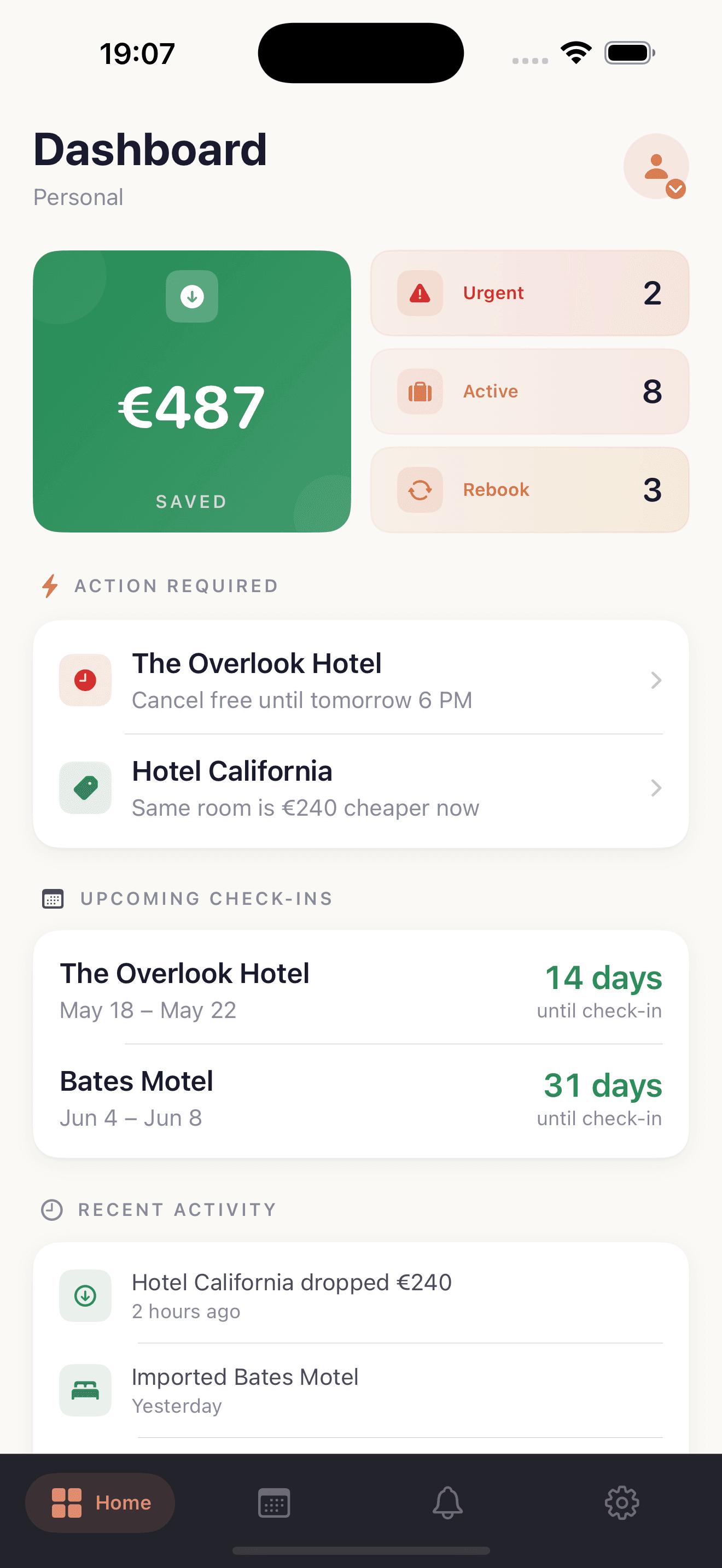
The home screen lands you on three things, one tap from anywhere:
- Your savings so far this year. Every successful rebook gets counted on this tile. Proof the watching is worth it.
- What needs you right now. The Overlook Hotel deadline closes at 6 PM tomorrow. Hotel California is €240 cheaper today than what you paid. Either is worth opening the app for. Both at once is the kind of day you want to catch in time.
- What's coming up. Check-ins ranked by date. No spelunking through inbox folders the day before you fly.
This is the same urgency-sorted portfolio the web dashboard shows, formatted for a phone. The deadline closing tomorrow is always first. The booking you locked in last month and forgot about is at the bottom where it belongs.
The cancellation countdown
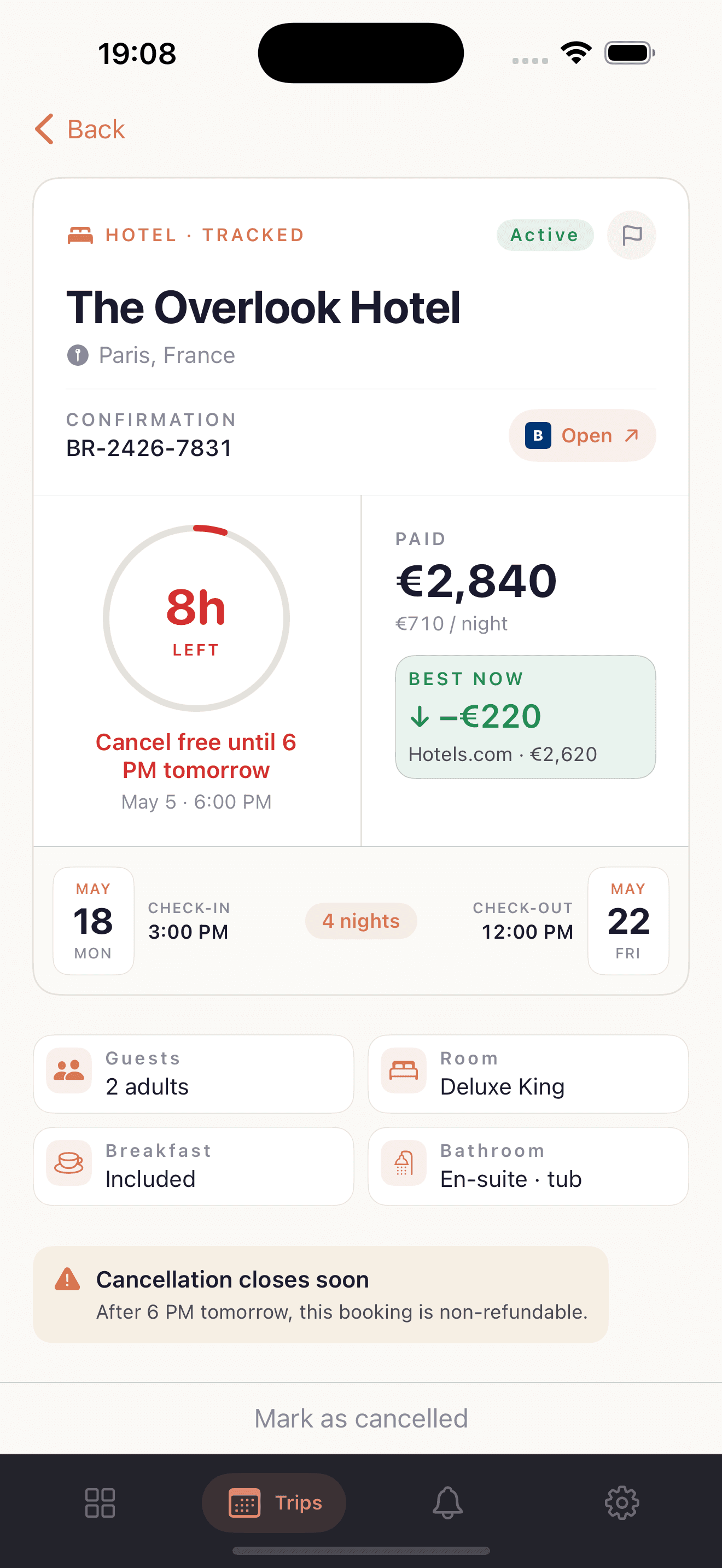
Tap a booking and you get everything that matters about it on one screen:
- The countdown ring. Red inside 24 hours, amber inside a week, neutral after that. The ring shrinks as the deadline approaches.
- What you paid and what it costs now. No comparison shopping required — we run price checks daily across Booking.com, Hotels.com, Google Hotels, and a handful of other sources, and surface the cheapest refundable rate we found.
- The booking link. Tap "Open" to jump back into the platform where you originally booked. From there you compare, cancel the old one, book the new one.
We don't auto-cancel anything. Every consumer service that has tried — DreamCheaper, Tingo, Service App — has died trying to manage that complexity on the user's behalf. Double-bookings, support tickets, liability. We tell you, fast, and you decide.
Alerts that reach you at the right moment
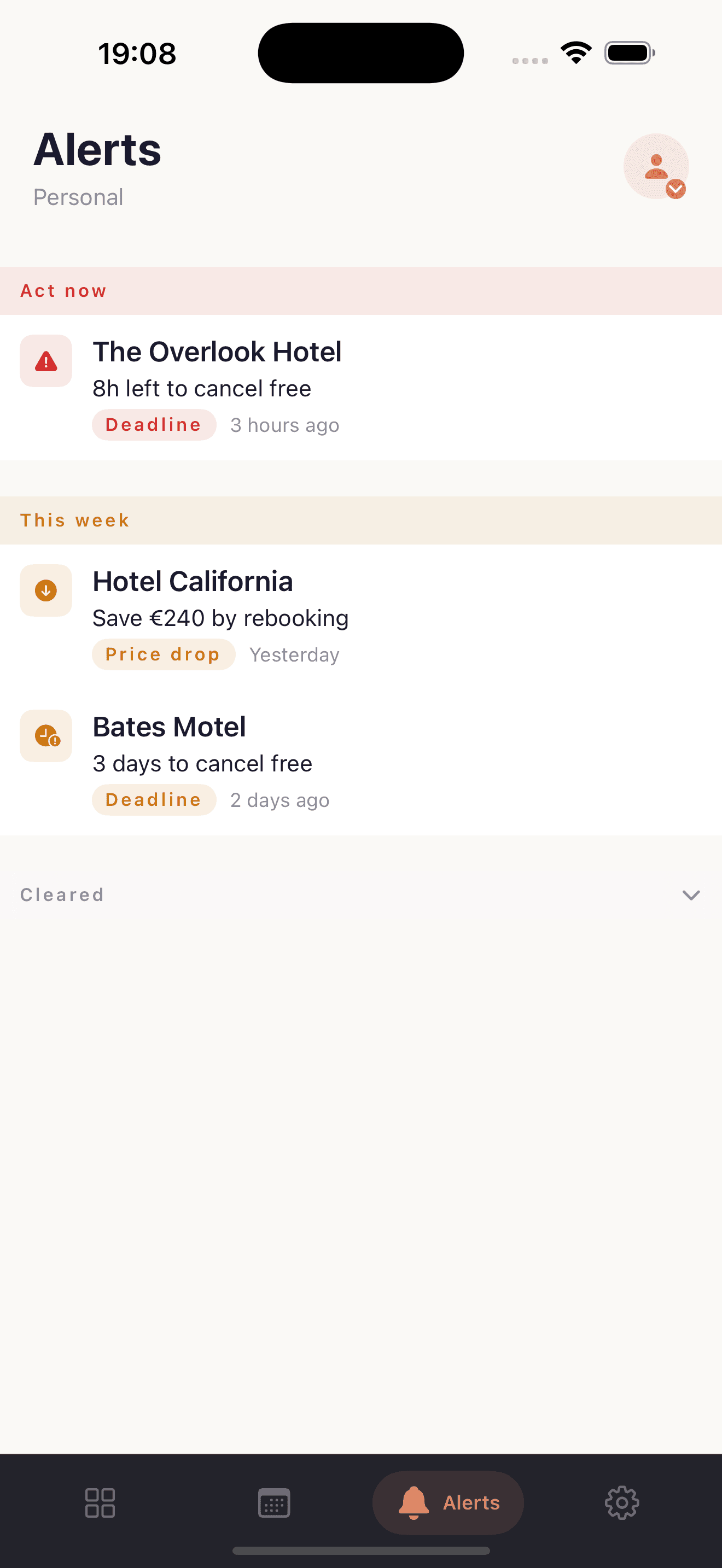
Push notifications are the reason we built this. An email alert is easy to mark unread. A push that says "8 hours left to cancel the Overlook Hotel" while you're at lunch is harder to ignore.
Inside the app, alerts are grouped by urgency, not chronology. "Act now" is anything in the next 24 hours. "This week" is the rest. Once you've actioned an alert — rebooked, cancelled, or just decided to leave it — it drops to "Cleared" and stops nagging.
Both kinds of alert respect your quiet hours, every time, including imminent deadlines. The phone doesn't buzz at 2 AM because something expires at 3 PM the next day. If you're paying us to be the watchdog, we shouldn't be the thing that wakes you up.
Two kinds of alert reach your lock screen:
| Alert | When it fires |
|---|---|
| Deadline alert | Inside the window we set per booking, usually around 24 hours before the cancellation deadline |
| Price drop alert | A refundable rate at the same hotel comes in cheaper than what you paid |
How a booking actually gets into the app
Same process as the web. Nothing new to learn:
- Forward a hotel confirmation email to inbox@stayhawk.app from the email you signed up with. No Gmail OAuth, no app permissions.
- We parse the hotel, dates, rate, and cancellation deadline. Usually within ten seconds.
- The booking appears in the dashboard, the price pipeline starts watching it daily, and the deadline goes in the queue.
If you've already got bookings on the web dashboard, they're already there. Open the app and they sync. First login is the slowest moment. After that, the experience is local.
You can also use the StayHawk Chrome extension to import directly from a hotel website in one click — useful when there's no confirmation email yet, or it came through a corporate portal that hides them. Either way, the booking lands in the same place.
What's on which plan
Nothing changes between web and iOS. Same workspace, same limits, same plan:
| Free | Pro | Agency | |
|---|---|---|---|
| Bookings tracked | 5 | 30 | 500 |
| Deadline alerts | ✓ | ✓ | ✓ |
| Daily price monitoring | — | ✓ | ✓ |
| Push notifications | ✓ | ✓ | ✓ |
| Native iOS app | ✓ | ✓ | ✓ |
The app itself is free to download. The free plan covers five bookings with deadline alerts and push — enough to feel the value on one trip. Pro is £9/month or £79/year for 30 bookings and price monitoring. Agency is £49/month for 500 bookings and a team workspace.
We don't gate the app behind a subscription. A free-tier user with one booking and one cancellation alert gets the same iOS experience as a Pro user with thirty. Fewer bookings on screen, that's all.
A note on the engineering
For the curious: the iOS app is built thin. Every screen pulls a fully-formatted view-model from one HTTP endpoint we call our Experience API. Swift doesn't format dates, pick icons, or translate strings — the server does. We wrote about why and what we got out of it in Backend for Frontend, scoped to one screen.
The practical consequence: the iOS app stays small, the build queue stays short, and a one-letter typo fix on a screen doesn't need a 28-hour App Store review.
Try it
If you've used StayHawk on the web, the iOS app costs nothing extra and works with the same login. If you haven't, install it, forward your next hotel confirmation, and see what happens.