The problem
StayHawk uses Gemini to generate every illustration on this site. Blog heroes, homepage sections, empty states. They share a locked visual style: thin hairline outlines, cream backgrounds, sparse compositions with a single coral accent dot.
About 60% come back wrong.


Gotcha
The problem is not image generation quality. Gemini produces beautiful images. The problem is consistency. The same prompt with the same subject will produce a clean result one time and a blob-covered mess the next. Manual iteration works, but it does not scale.
The manual fix was not sustainable
Every illustration meant the same drill: tweak the subject text, regenerate, squint at the result, tweak again. Twenty to thirty minutes per illustration, every time. Sometimes longer when Gemini decided to paint dark blobs over half the canvas. Multiply that by every blog post, every landing page section, every empty state, and illustration work was eating hours each week.
We needed a way to automate the squinting.
What is AutoResearch?
Andrej Karpathy — former Tesla AI director and OpenAI founding member — published a pattern he calls AutoResearch. The idea: instead of a human manually running experiments, checking results, and deciding what to try next, you hand that entire loop to an LLM agent.
The pattern has three ingredients:
-
A scorecard the agent cannot change. This defines what "good" means. The agent reads it but never edits it. In ML training, this is the validation metric. In our case, it is 15 binary checks on every generated image.
-
One thing the agent is allowed to change. This is the artifact being improved. For Karpathy, it is
train.py— model architecture, hyperparameters, optimizer config. For us, it is the illustration subject text. -
A rule: keep improvements, throw away failures. After each experiment, the agent compares the new score to the current best. Better? Keep it. Worse or the same? Discard it and try something else.
Why does this work? The agent explores hundreds of variations while you sleep. It does not get bored or frustrated. It does not forget what it tried three iterations ago. And because only improvements survive, the score moves in one direction: up. This steady upward march is called convergence — the point where the score stops improving because the agent has found a strong result.
The search space — all possible variations the agent could try — is enormous. A human might try 5-10 variations and give up. The agent tries hundreds, methodically, across every dimension you allow it to explore.
Karpathy applied the pattern to ML training code and ran 100+ experiments overnight on a single GPU. Others applied it to voice agent prompts, taking a scheduling agent from 25% to 100% success rate in 20 iterations. We applied it to illustrations.
Our three-layer parallel
AutoResearch is interesting because of its structure, not any single application. Karpathy's repo has three files, each representing a different layer of programming:
prepare.py — the file that defines the test. The agent cannot touch it. It sets up data, runs the evaluation, and produces the score. Everything about what "good" means lives here.
train.py — the file the agent edits each cycle to try something new. Model architecture, optimizer, hyperparameters — all fair game. This is the only thing that changes between experiments.
program.md — natural-language instructions telling the agent how to search. Karpathy calls it "research org code written in English." It tells the agent how to behave as a researcher without specifying what changes to make.
Our system maps to the same three layers:
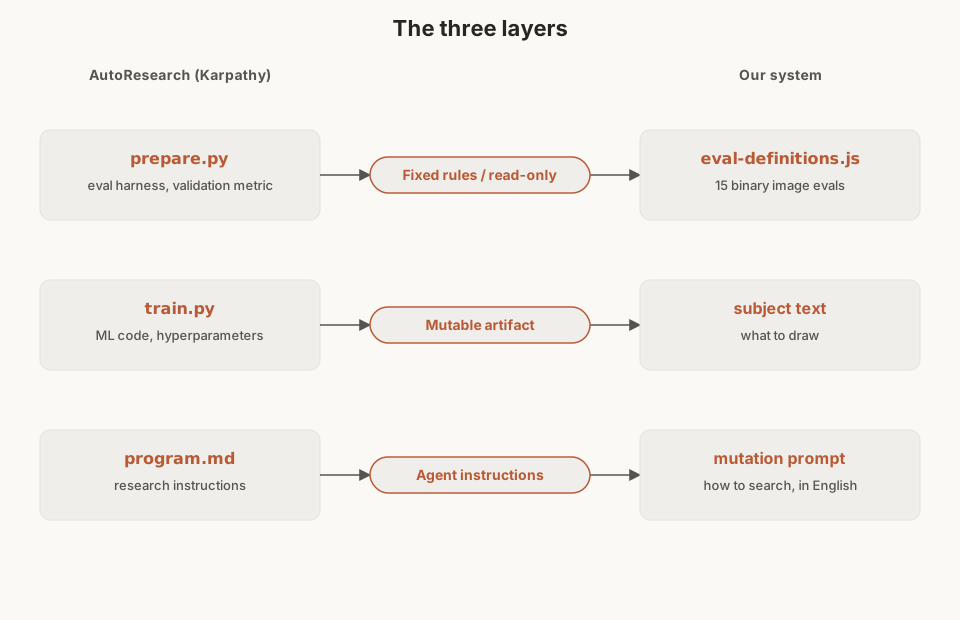
The human never edits the subject text directly. Instead, the human writes instructions that program how the agent searches.
Info
This is the shift that makes AutoResearch interesting: the human stops doing the research and starts programming the process that does the research. We stop tweaking illustration prompts and start writing rules for how the mutator should tweak them.
The experiment loop
Each iteration: generate 3 variants, score them, keep the best one if it beats the current champion.
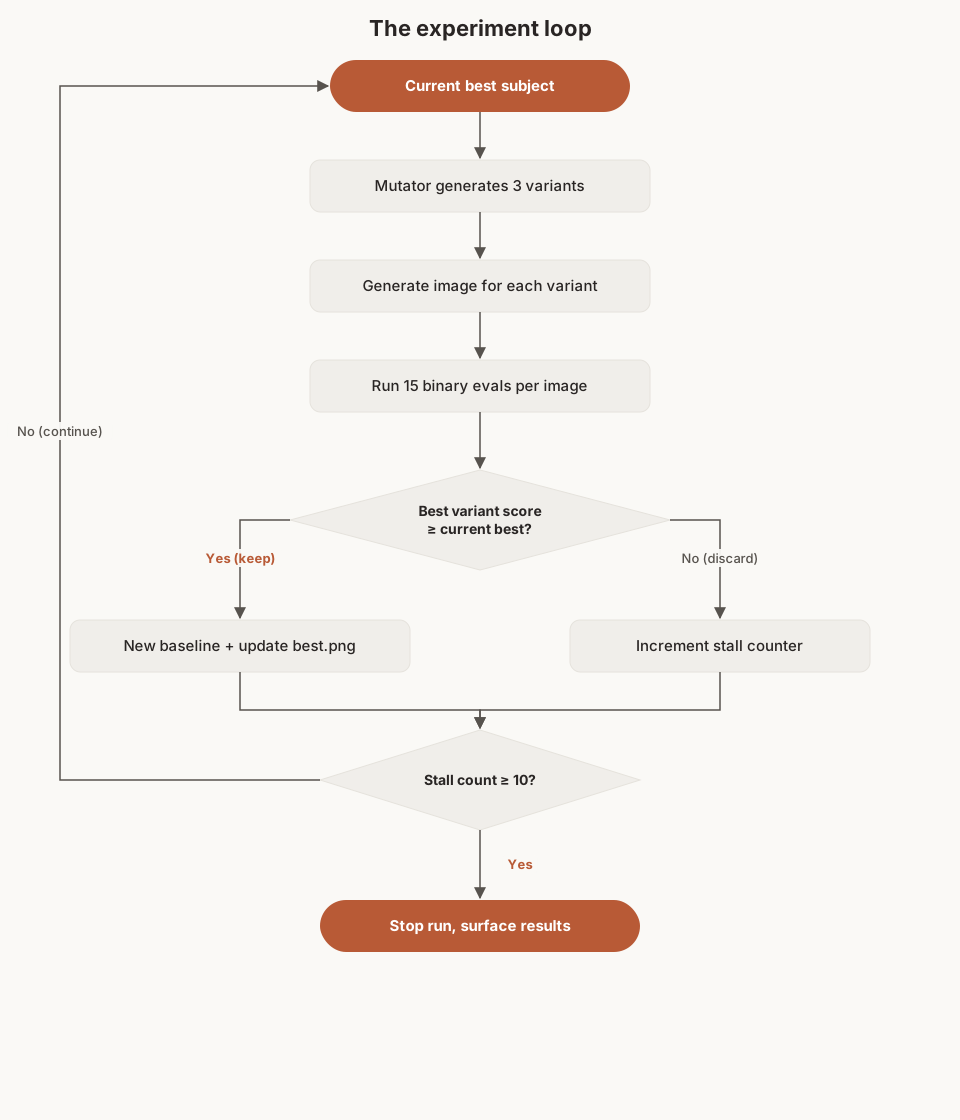
Where AutoResearch uses git commits (keep on improvement, revert on failure), we use a simpler keep/discard model since our mutable artifact is a text string, not a file. But the logic is identical: only improvements survive.
| Metric | AutoResearch | Our system |
|---|---|---|
| Experiments per hour | ~12 | ~40 |
| Time budget per experiment | 5 minutes (GPU) | ~90 seconds (API) |
| Performance metric | val_bpb (lower is better) | Passing evals out of 15 (higher is better) |
| On failure | Git revert | Discard variant |
| Overnight run | ~100 experiments on one H100 | ~100 iterations for ~$17 |
The eval layer (our prepare.py)
In AutoResearch, prepare.py defines the evaluation metric and cannot be modified by the agent. Our equivalent is eval-definitions.js — 15 binary questions with expected answers:
no_blobs              Are there dark splatter artifacts?              expect: no
cream_background      Is the background warm cream?                   expect: yes
diagonal_composition  Are elements spread diagonally?                 expect: yes
coral_accent_present  Is there a coral accent element?                expect: yes
coral_under_10pct     Does coral cover less than 10%?                 expect: yes
no_text               Does the image contain any text?                expect: no
no_forbidden_colors   Any blue/teal/purple/pink/green/red/yellow?     expect: no
thin_outlines_only    Any thick borders or heavy dark fills?          expect: no
sparse_elements       Element count under threshold?                  expect: yes
no_3d_or_gradients    Any 3D effects, shadows, or gradients?          expect: no
negative_space        At least 30% empty cream background?            expect: yes
no_human_faces        Any detailed human faces with features?         expect: no
clear_focal_point     Does one element clearly draw the eye first?    expect: yes
subject_elements      Is every named element present and shaped right? expect: yes
subject_relationship  Are described relationships faithfully drawn?   expect: yes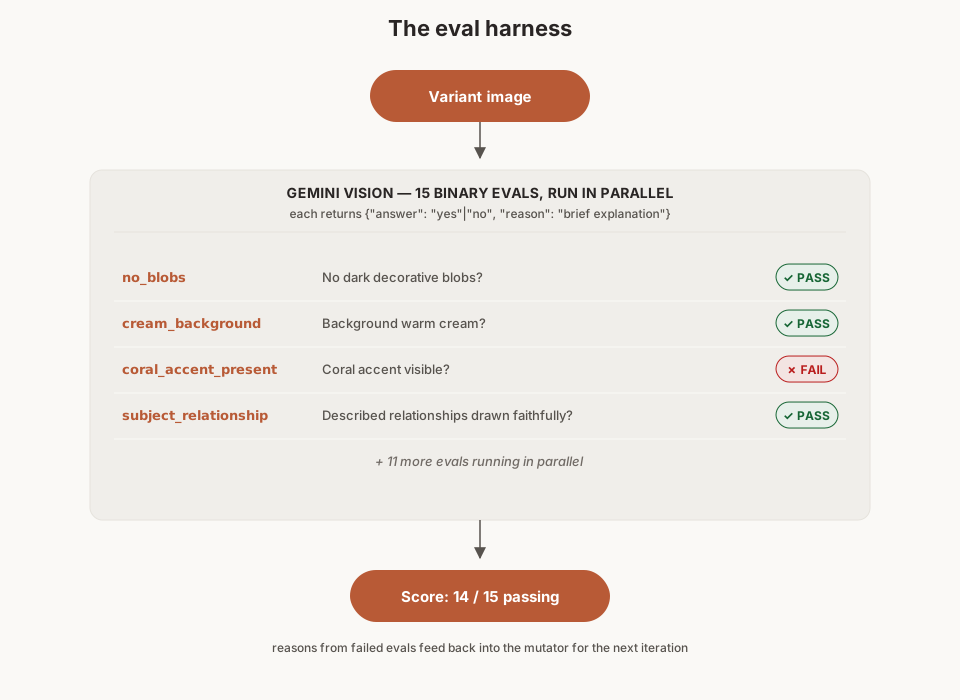
We tried a single "rate this image 1-10" prompt first. It did not work. The scores varied by 2-3 points between identical runs and the failure reasons were too vague to act on.
Info
Switching to 15 binary questions dropped scoring variance from about 30% to under 5%. AutoResearch works because val_bpb is a stable, reproducible number. Our loop works because we made our metric equally stable. If your eval is noisy, the loop cannot converge.
Each eval — a test that checks one specific thing — returns a JSON object with answer and reason. The reason string is what makes the loop converge. When no_blobs fails with "dark splatter shapes near the price tag," the mutator knows exactly what to fix next. This is analogous to how AutoResearch agents read training logs to decide what to change in train.py.
The mutation layer (our train.py)
In AutoResearch, the agent edits train.py freely — architecture, hyperparameters, optimizer, batch size, everything. Our mutable artifact is smaller (a paragraph of subject text instead of a training script), but the mutation strategy matters just as much.
Early versions let the mutator rewrite the subject freely. This caused thrashing — fixing blobs would break composition, fixing composition would introduce forbidden colors. The equivalent in AutoResearch terms: an agent making sweeping architectural changes every iteration instead of focused modifications.
We added a constraint: each variant must change one thing and target a different failure.
BEFORE (scatter-shot, score 5/15):
  "A hotel key and price tag with a calendar showing dates,
   surrounded by decorative elements on a cream background"
  Failing: no_blobs, no_forbidden_colors, thin_outlines_only,
           sparse_elements, no_text

AFTER (targeted variant A, targets no_blobs, score 12/15):
  "A hotel key outline in the left third, cream fill.
   A curved dashed path arcs toward a small coral dot.
   Only these elements on a pure clean cream background
   - absolutely nothing else."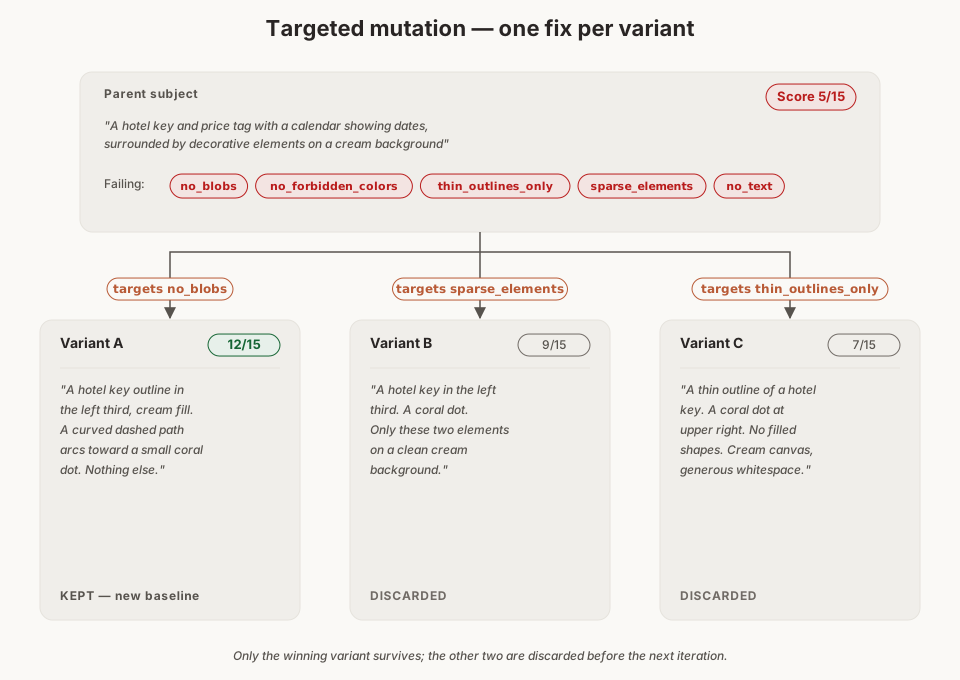
Tip
Every variant ends with: "Only these elements on a pure clean cream background, absolutely nothing else." This suffix is our version of a training constraint. It prevents the model from adding decorative elements that trigger blob failures.
Stall detection
AutoResearch reverts changes that do not improve the metric. We added explicit stall detection on top of that pattern:
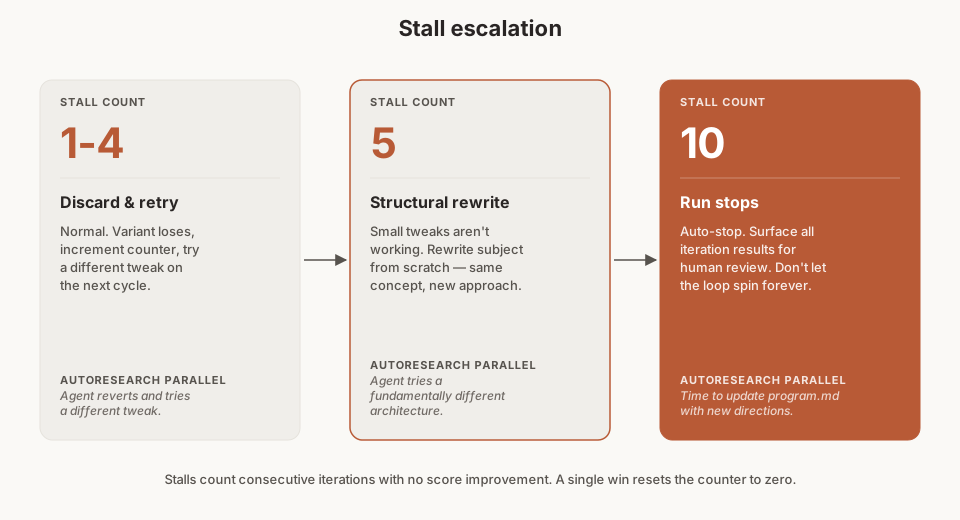
The structural mode switch at 5 stalls is important. Small tweaks to a subject that is structurally wrong will never converge. The mutator needs permission to throw everything out and start over with the same concept but a different visual approach.
Architecture
Seven Node.js files, no frameworks:
auto-improve.js          # CLI entry point (headless, like AutoResearch overnight)
improve-server.js        # localhost:3334 web UI (node:http, SSE streaming)
lib/
  improvement-engine.js   # Core loop (the experiment runner)
  subject-mutator.js      # Gemini text: 3 variants per cycle (the "agent")
  vision-evaluator.js     # Gemini vision: 15 binary evals (the "eval harness")
  eval-definitions.js     # The 15 criteria, read-only (our prepare.py)
  results-store.js        # JSON persistence (our experiment log)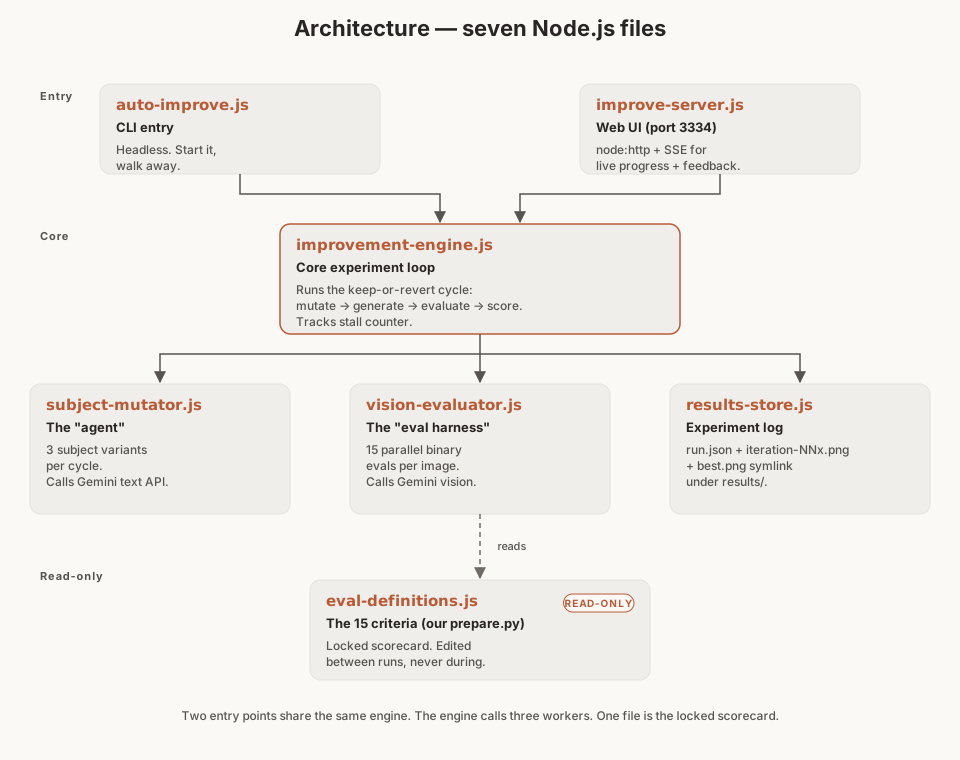
Two entry points share the same engine. The CLI runs headless — start it, walk away, check results later. Same idea as running AutoResearch overnight:
$ node scripts/auto-improve.js \
    --subject "A compass outline in the left third, cream fill. \
    A curved dashed path arcs toward a suitcase outline in the \
    right third. A small coral dot at the peak of the arc. Only \
    these elements on a pure clean cream background." \
    --placement blog-hero \
    --iterations 10

=== Illustration Auto-Improve ===
Run run-2026-03-23-143022 started

--- Iteration 1 ---
  Mutated: a (remove size ref), b (shift suitcase lower), c (add tilt)
  Generated: iteration-01a.png
  Evaluated a: 10/15
  Generated: iteration-01b.png
  Evaluated b: 12/15
  Generated: iteration-01c.png
  Evaluated c: 9/15
  Winner: b (12/15) KEPT | Best: 12/15 (iter 1) | Stalls: 0

--- Iteration 2 ---
  Mutated: a (fix diagonal spread), b (reduce coral), c (simplify arc)
  Winner: a (14/15) KEPT | Best: 14/15 (iter 2) | Stalls: 0
The web UI adds something AutoResearch does not have: real-time human feedback during the loop. It streams progress over SSE and shows each iteration with its 3 variant images, scores, and pass/fail badges for each eval.
Human-in-the-loop (where we diverge)
AutoResearch runs fully autonomously. Our system can too, but we added an optional feedback channel.
The web UI lets you give thumbs up or down on any variant without pausing the loop. That feedback is stored and injected into the mutator context in the next cycle.
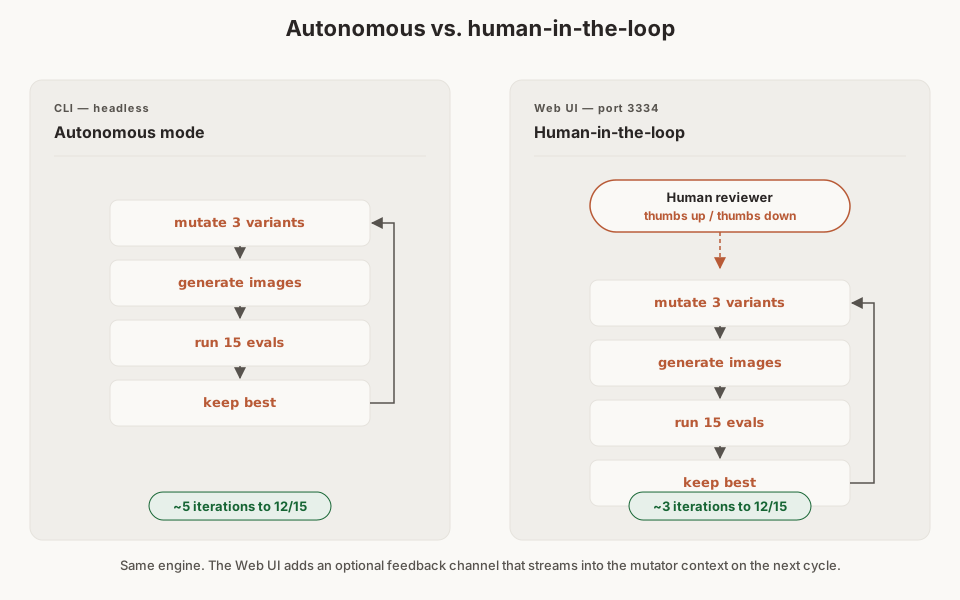
The feedback is a nice-to-have, not a requirement. Autonomous runs still converge. But sometimes an image passes all 15 evals and still looks off in a way that is hard to formalize. A thumbs down on that variant tells the mutator "try something different" without needing to write a new eval.
What we learned
Tip
Starting quality matters more than iteration count. A well-structured starting subject (2-3 elements, explicit positions, coral dot placed, negative declaration at the end) typically reaches 12/15 in 3 iterations. A vague subject might take 15 to get there. This tracks with AutoResearch: a reasonable train.py baseline converges faster than starting from scratch.
Warning
Some concepts are cursed. Price tags and calendars in combination reliably attract dark blob artifacts from Gemini. No amount of subject tweaking fixes this. We learned to substitute: "luggage tag" instead of "price tag," "graph outline" instead of "calendar." The loop surfaces these dead ends fast because you see the same eval failing across 10 variants in a row.
Costs
| AutoResearch | Our system | |
|---|---|---|
| Per iteration cost | 5 min GPU time on H100 | ~$0.17 in API calls |
| Typical useful run | 12 hours, ~100 experiments | 3-5 iterations, $0.51-$0.85 |
| Full overnight run | ~100 experiments | ~100 iterations, ~$17 |
| Hardware required | NVIDIA H100 GPU | Any machine with internet |
We usually get a good result in 3-5 iterations, which costs less than the engineering time we were spending on manual regeneration.
The pattern generalizes
What makes AutoResearch interesting is not the specific application to ML training. It is the structure: fixed eval rules, a mutable artifact, agent instructions in natural language, and a keep-or-revert loop. That structure works anywhere you can define "good" as a stable, measurable metric.
We applied it to image generation. Others have applied it to voice agent prompts, distributed model training, and prompt optimization. MindStudio published a detailed walkthrough of using Claude Code to run the same loop on AI customer service prompts — binary assertions, 3 variants per cycle, overnight autonomous runs. Their pass rates went from 40-50% to 75-85% over 30 cycles. Same pattern, completely different domain.
The ingredients are the same:
- Lock down your evaluation criteria so the agent cannot game them
- Give the agent a single artifact to modify
- Write instructions that program the search process, not the outcome
- Keep only improvements, revert everything else
- Add stall detection so the loop does not spin forever
The human stops doing the work directly and starts programming the process that does the work. That shift is what people find interesting about AutoResearch, and it is what made our illustration pipeline go from 30 minutes of manual tweaking to a command you run and walk away from.
$ node scripts/auto-improve.js \
    --subject "your subject here" \
    --iterations 5

# Come back in 8 minutes.
# Best image is at results/run-id/best.png